

Claude Code or Codex: how to choose
Both read your project, edit files, run commands and work from a chat. The headline difference is smaller than the internet suggests, and the useful question is not which one wins. It is which one fits the task in front of you, and whether you need to choose at all.
In short
- The two share most concepts. They mostly differ in names, defaults and taste.
- Test both on one real task from your own project. Headlines and benchmarks will not tell you what suits your code.
- Their usage limits are separate, so a second agent is also a backup.
- The strongest setup many people land on is one agent builds and the other reviews.
Same idea, different name
If you know one, you already know most of the other. This table maps the concepts using each tool's own documentation:
| Concept | Claude Code (Anthropic) | Codex (OpenAI) |
|---|---|---|
| Sign in with | Claude Pro, Max, Team or Enterprise account | ChatGPT Plus, Pro, Business, Edu or Enterprise account |
| Project instructions file | CLAUDE.md | AGENTS.md, created with /init |
| Choose the model | /model, aliases such as opus, sonnet, haiku, opusplan | /model |
| How much it may do without asking | Permission modes, switched with Shift+Tab | /permissions |
| Resume an old chat | /resume | codex resume |
| External tools | MCP servers, /mcp | MCP servers, codex mcp |
| Run from a script | claude -p | codex exec |
| Check session settings | /status | /status |
Where they genuinely feel different
Permissions
Claude Code documents six permission modes, from asking about everything to running without prompts:
| Mode | Runs without asking |
|---|---|
default (called Manual) | Reads only |
acceptEdits | Reads, file edits and common file commands such as mkdir and mv |
plan | Reads, so it can explore before changing anything |
auto | Everything, with a second model checking actions in the background |
dontAsk | Only pre-approved tools, anything else is denied. Meant for CI. |
bypassPermissions | Everything. Intended for isolated containers and virtual machines. |
Codex lets you choose when it may edit files or run commands without asking, through /permissions or per run. Check its current documentation for the exact levels before you widen access on a real project, because both tools change this often.
Models and effort
Claude Code exposes aliases and an effort setting. opusplan uses the strongest model while planning and switches to a faster one for execution, and /effort trades depth for allowance. On the Codex side you pick the model with /model. The practical effect is the same: you decide how much thinking each task deserves.
Taste
People notice real differences in how each one explains itself, how often it asks questions, how large its diffs are and how it writes tests. These are hard to measure and easy to overstate. The only reliable way to learn yours is to try both.
A fair way to test both
- Pick a real task of moderate size from your own project, such as adding rate limiting to a route with tests.
- Put the same instructions in
CLAUDE.mdandAGENTS.mdso neither has an advantage. - Give each the same prompt, from a clean checkout, with the same permissions.
- Judge the result, not the story. Run the tests yourself and read the diff.
- Write the scores down before you decide.
| Criterion | Claude Code | Codex |
|---|---|---|
| Tests pass on first run | ||
| Size and clarity of the diff | ||
| Questions it asked, were they useful | ||
| Time to a result you would merge | ||
| Share of your allowance used |
Using both on purpose
The biggest gain is rarely picking a winner. A different model catches different mistakes, and each tool has its own allowance.
Builder and reviewer
One writes the change, the other reads the diff cold. The reviewer has no attachment to the first approach.
Plan with one, build with the other
Use the stronger reasoning model to plan and a faster one to execute, in either tool.
Backup for limits
When one allowance runs out, the other is still full. See our guide to hitting a Claude Code limit.
The cost of two tools, and how to remove it
The usual objection is friction: two windows, two histories, and explaining the task twice. Aloft removes that by running Claude Code and Codex in one chat. You switch engines mid conversation, the history stays, and the other engine gets the part it missed. In the screenshot below, Claude made the change and Codex was asked to review it in the same chat.
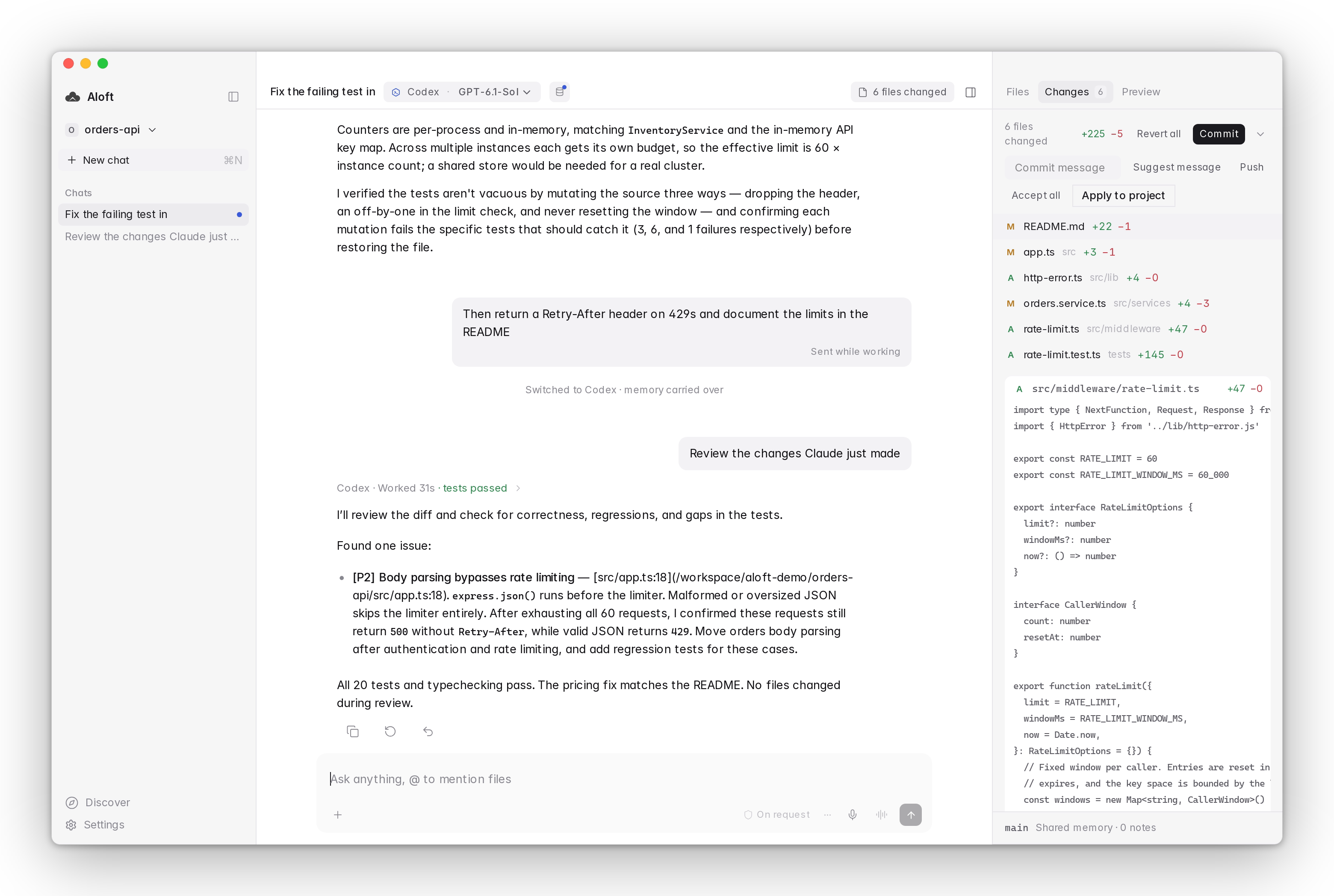
Aloft uses your own Claude and ChatGPT accounts, so there are no API keys and no extra bill. With Auto on, it can choose the model for each message and move on when an engine runs out of allowance.
Our honest advice
- Start with the one you already pay for.
- Run the fair test once, on your own code.
- Keep the second as reviewer and backup.
- Revisit in a few months. Both tools change fast.