

Hit your Claude Code limit? What to do next
You are halfway through a change, the agent is finally on the right track, and then: you've hit your limit. Before you wait or switch tools, it helps to know which limit it is, because the right move is different for each one.
In short
- A session or weekly limit is shared across all models. Changing model with
/modelwill not bring you back. - A model limit (Opus or Sonnet) is different: moving to another family does keep you working.
- Long chats burn allowance fastest, because every request carries the whole conversation.
- Claude Code can wait for the reset and continue by itself. Another engine can keep you moving right now.
First, read the message
Anthropic's documentation separates the messages you can get. They look alike and mean different things:
| Message | What it means | What actually helps |
|---|---|---|
| "You've hit your session limit" or "weekly limit" | A seat window on your subscription, shared across every model. | Wait for the reset time shown, add usage credits, or work in another tool. /model does not help. |
| "You've hit your Opus limit" or "Sonnet limit" | A cap on one model family. | Switch to a model outside that family with /model and keep going. |
| "Individual spend limit", "org's monthly spend limit" | Your usage credits reached a limit someone set. | Raise the limit in settings, or an admin does it on Team and Enterprise plans. |
| A context or auto-compact warning | Not a usage limit. The conversation is close to the context window. | /compact or /clear, see below. |
Why long chats cost so much
Claude Code sends your full conversation with every request, and each time Claude uses a tool it sends another request carrying the tool results. Prompt caching makes re-reading that history cheaper, but it is not free. A one line question in a chat that has been open all day still draws on the whole history.
This is why the same task in a fresh chat can cost far less than in a chat that has been going for hours. Cache lifetime matters too: on a subscription the cache lasts an hour, so the first message after a long break reprocesses the full context.
Eight ways to stretch your allowance
1. Clear between tasks
Unrelated work should not carry old context.
/rename/clear/resume2. Compact with a hint
Tell the summary what to keep.
/compact Focus on code samples and API usage3. Match model to job
Sonnet handles most coding work. Keep Opus for hard architecture and multi step reasoning.
/modelopusplan4. Lower the effort
Thinking tokens are billed as output. Simple tasks do not need maximum effort.
/effort5. Trim the setup
Disable MCP servers you are not using and keep CLAUDE.md under about 200 lines. Move rarely used instructions into skills.
/context/mcp6. Plan before you build
Plan mode proposes an approach for approval, which prevents expensive rework.
Shift+Tab7. Stop early, rewind
If the agent drifts, interrupt at once instead of paying for the wrong path.
Esc/rewind8. Be specific
"Add input validation to the login function in auth.ts" reads less than "improve this codebase".
To see where your allowance is going, run /usage. On a subscription it breaks recent usage down by skills, subagents, plugins and individual MCP servers, and flags behaviors such as long context or cache misses once one accounts for 10% or more.
If you wait, Claude Code can continue on its own
On recent versions (v2.1.234 or later) with a claude.ai subscription, an interactive session waits in place and continues the task after the reset. You will see something like this:
A few details worth knowing, all from the documentation:
- It picks the task up where it stopped. It does not resend your last message.
- If your computer slept for more than about 30 minutes, press
Enterto continue. - The task still asks for permissions, so it can stall on a prompt while you are away.
- If it hits the limit again it re-arms at most twice, then stops.
- It does not start by itself when the reset is more than 24 hours away, which is common for a weekly limit. Use
/rate-limit-optionsto start it yourself. - Not offered on API keys or cloud providers, where usage is metered per request.
Three ways to keep going
| Wait for reset | Usage credits | Switch engine | |
|---|---|---|---|
| How | Automatic continue, or just come back later | /usage-credits | Move the work to Codex or another agent |
| Cost | Nothing extra | Pay as you go on top of the plan | Uses a separate allowance you already have |
| You keep working now | No | Yes | Yes |
| Context | Kept | Kept | Usually lost unless something carries it over |
The last column is where most people lose time. Opening a second tool means explaining the task again, and the new agent has not seen the files you just discussed.
Switching without starting over
Aloft runs the official Claude Code and Codex on your own computer inside one chat. When a limit hits, the history stays in the same chat and the other engine receives the part it missed.
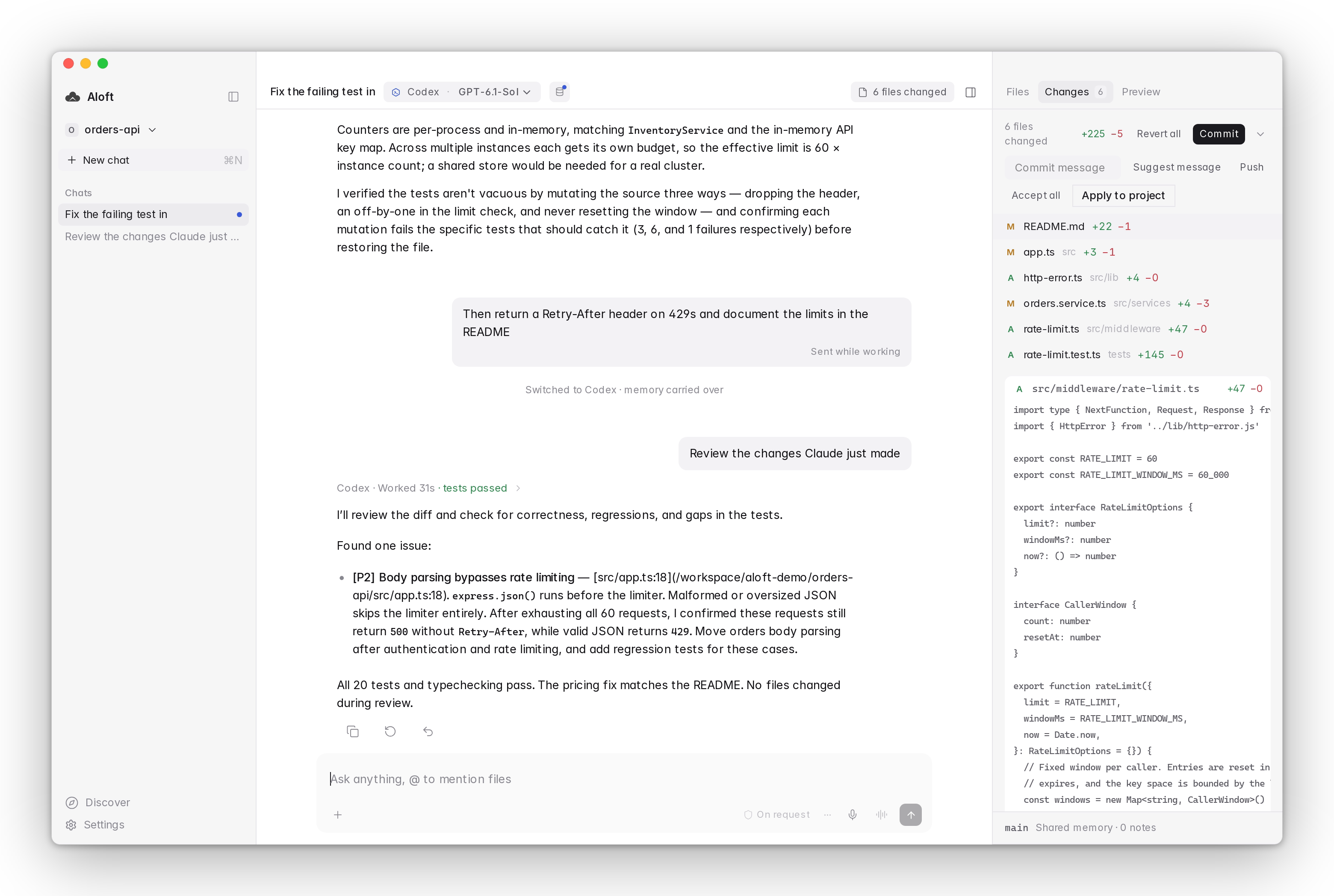
There is a setting called When I hit a limit with three choices:
Ask me
You decide each time.
Switch automatically
Aloft carries the chat to the next engine or model and sends your message again. A note tells you who hit the limit and where it continued.
Wait for reset
Aloft keeps the chat on the same engine and continues when the limit resets. If the engine is still limited, it stops trying instead of looping.
With Auto model turned on, Aloft also picks a model for each message and shows why in a small chip, for example "coding task, balanced model" or "model is at its limit, next model". Aloft signs in with your own Claude and ChatGPT accounts, so there are no API keys and no extra bill.
Before your next long session
- Start a fresh chat for each new task, and name old ones so you can resume them.
- Pick the model for the job instead of leaving the strongest one on.
- Check
/contextonce. Turn off tools you do not use. - Know your fallback before you need it: wait, credits, or a second engine.